 Zhcloudlink
Home / Technology / From RTSP to WebRTC: A Practical Guide to Streaming Protocols, Formats and Selection
Technology
From RTSP to WebRTC: A Practical Guide to Streaming Protocols, Formats and Selection
In surveillance, live commerce, online education, video conferencing and VOD platforms, streaming systems revolve around two questions: how media data is transported, and how audio and video are encapsulated and encoded. The former is about protocols; the latter is about formats. Understanding the difference—and selecting based on latency, compatibility, firewall traversal and CDN cost—is the first step in designing a streaming architecture.
In surveillance, live commerce, online education, video conferencing and VOD platforms, streaming systems revolve around two questions: how media data is transported, and how audio and video are encapsulated and encoded. The former is about protocols; the latter is about formats. Understanding the difference—and selecting based on latency, compatibility, firewall traversal and CDN cost—is the first step in designing a streaming architecture.
1. Protocols vs. Formats: “How to transport” and “how to package”
A protocol defines how media data is transported, controlled and managed over a network, such as RTMP, RTSP, HLS and WebRTC. It determines connection setup, session control, transport behavior and latency characteristics.
A format defines how audio and video data is organized and encapsulated, including container formats such as FLV, MP4 and TS, and codecs such as H.264, AAC and AV1. It determines how media is structured, stored and decoded for playback.
In short: a protocol solves “how to transport,” while a format solves “how to package.” Real systems usually combine protocol, container and codec—for example, RTMP ingest with FLV container and H.264/AAC codecs, or HLS delivery with TS segments and adaptive bitrate.
2. Five mainstream streaming protocols
RTSP: Real-Time Streaming Protocol
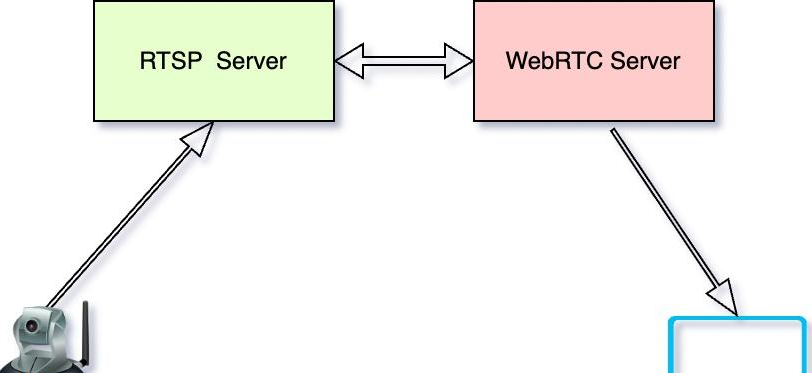
RTSP is mainly used for real-time video communication such as surveillance cameras and video conferencing. It does not directly carry media data; instead, it establishes and controls media sessions, while actual data is usually transported over RTP/RTCP. A typical flow includes DESCRIBE, SETUP and PLAY requests, with the server returning SDP media descriptions.
RTMP: A mature choice for live ingest
RTMP is an Adobe-developed real-time messaging protocol over TCP, providing stable and relatively low-latency connections for live ingest. It supports AMF serialization and uses port 1935 by default, which may be blocked by firewalls. Although Flash has been retired, RTMP is still widely supported by tools such as OBS for publishing.
HLS: HTTP-based adaptive streaming
HLS was introduced by Apple and is based on HTTP. It splits streams into TS segments and organizes them with m3u8 playlists. Its strengths include excellent compatibility, CDN friendliness and adaptive bitrate support; the trade-off is higher latency, commonly 10–30 seconds. HLS is suitable for VOD, standard live distribution and high-concurrency scenarios.
FLV and HTTP-FLV: a practical low-latency option
FLV is a container format once tightly coupled with Flash Player. Although native browser support has declined, FLV is still used in HTTP-FLV low-latency live streaming: the server continuously delivers an FLV stream over HTTP long connections, and the client decodes it with JavaScript. Latency is relatively low, but adaptive bitrate is usually not built in.
WebRTC: native real-time communication in browsers
WebRTC is a W3C standard for plugin-free real-time audio and video communication between browsers. Its core includes MediaStream, RTCPeerConnection and RTCDataChannel. It typically uses UDP transport with SRTP for security. WebRTC can achieve sub-second latency, making it suitable for video conferencing, interactive live streaming and online education, but NAT traversal usually requires STUN/TURN support.
3. Technical comparison
| Feature | RTSP | RTMP | HLS | HTTP-FLV | WebRTC |
|---|---|---|---|---|---|
| Latency | Very low (<1s) | Low (2–5s) | High (10–30s) | Low (2–5s) | Ultra-low (<1s) |
| Transport basis | TCP/UDP + RTP | TCP | HTTP | HTTP | UDP + SRTP |
| Browser support | Plugin required | Flash required (retired) | Native | JavaScript decoding | Native |
| Firewall traversal | Poor | Poor | Excellent | Excellent | Moderate (STUN/TURN) |
| Adaptive bitrate | No | No | Yes | No | Limited |
| Main use cases | Surveillance, conferencing | Live ingest | VOD, live distribution | Low-latency live | RTC, interactive live |
4. Selection guide by use case
VOD platforms: Prefer HLS or MPEG-DASH for better adaptive capability and compatibility.
Standard live streaming with high concurrency and compatibility: Use RTMP for ingest and HLS for delivery to balance latency, compatibility and CDN cost.
Ultra-low-latency live streaming: Consider HTTP-FLV or WebRTC for second-level or sub-second latency.
Real-time communication: WebRTC is the first choice for video conferencing and online education.
Surveillance: RTSP remains dominant in traditional deployments due to hardware compatibility.
5. Modern architecture and trends
A typical live workflow includes ingest, cloud processing, content delivery and client playback. Broadcasters publish via RTMP using tools such as OBS; the server transcodes and packages multi-bitrate adaptive streams; the processed streams are distributed through CDN edge nodes; clients select the best quality based on network conditions.
Key trends include lower latency, standardization, improved coding efficiency and intelligence: moving from HLS latency of 10+ seconds toward WebRTC sub-second latency; broader support for MPEG-DASH as an international standard; new codecs such as AV1 and H.266 offering higher compression; and AI used for content understanding, quality enhancement and bandwidth prediction.
Conclusion
There is no single “best” streaming protocol—only the right combination for the business goal. VOD and standard live streaming should prioritize HLS/DASH compatibility and adaptivity; low-latency live can combine RTMP ingest with HTTP-FLV or WebRTC; real-time interaction should prioritize WebRTC; surveillance can continue to leverage RTSP’s hardware ecosystem. Understanding the boundary between protocols and formats leads to more robust architectural decisions.
Questions
What is the difference between a streaming protocol and a format?
A protocol defines how media data is transported and controlled over a network, such as RTMP, RTSP, HLS or WebRTC. A format defines how audio and video data is organized and encapsulated, including container formats such as FLV and MP4, and codecs such as H.264 and AAC.
Why is RTMP often used for ingest while HLS is used for delivery?
RTMP over TCP provides stable and relatively low-latency ingest, making it suitable for broadcaster-side publishing. HLS is HTTP-based, CDN-friendly, widely compatible and supports adaptive bitrate delivery, making it suitable for large-scale distribution. A common workflow is RTMP ingest, transcoding and packaging, then HLS/DASH delivery.
For ultra-low-latency live streaming, should I choose HTTP-FLV or WebRTC?
Choose WebRTC for interactive use cases such as video conferencing, online education and real-time co-hosting. HTTP-FLV can be a cost-effective option for large-scale low-latency live streaming and can reuse HTTP/CDN infrastructure. WebRTC can achieve sub-second latency but usually requires STUN/TURN and more specialized infrastructure.
HLS has higher latency; why is it still widely used for VOD and standard live streaming?
HLS offers broad compatibility, HTTP/CDN friendliness, adaptive bitrate support and mature tooling. For VOD, standard live distribution and high-concurrency scenarios, a 10–30 second latency is often acceptable, making HLS a practical balance among compatibility, cost and scale.